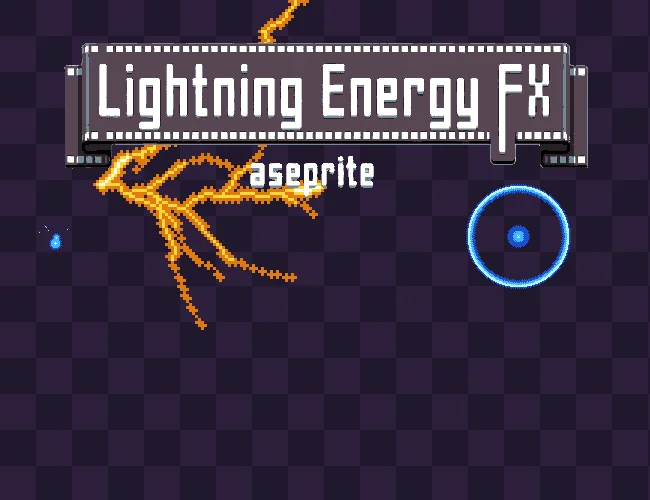
Lightning & Energy FX is a procedural VFX generator for Aseprite, designed specifically for pixel art.
Create lightning bolts, chain lightning, fireballs, lasers, energy balls, portals, sword slashes, shockwaves, ground cracks, shields, auras and much more — directly inside Aseprite.
Show full description...
Instead of drawing every frame by hand, set a point or two, pick a seed and generate. The plugin builds the whole animation for you and bakes it into real Aseprite frames, ready to edit, export and use in your game.
Same seed + same settings = the exact same pixels, frame for frame, on any machine.
✨ KEY FEATURES
🎛️ 15 Effect Types
Every type is a complete procedural generator with its own parameters:
- ⚡ Bolt — lightning between two points, with branches
- 🌩️ Strike — lightning from the sky to the target: stepped leader, bright return stroke and ground glow
- 🔗 Chain — hops through several points, one after the other
- ☄️ Projectile — charges, flies (with optional lob) and hits. Styles: Orb, Fire, Electric, Comet, Shard. Impacts: Burst, Explosion, Electric or Shatter
- 🌋 Ground Crawl — lightning running along the ground in both directions, with spikes rising
- 🔮 Tesla Orb — a glowing ball throwing bolts at points circling it
- 🛡️ Shield — arcs between nodes on a circle or a flat ellipse
- ✨ Aura — arcs crawling over the outline of one of your own layers, with an optional Electrocute flash
- 🔫 Laser — a straight, solid beam
- 💥 Pulse Beam — a thick beam with ripples and pulses (kamehameha, cannons)
- 🟣 Energy Ball — a shaded sphere of energy with orbiting swirls that charges, pulses and bursts
- 🌀 Portal — a glowing rim around a dark void with turning spiral arms; opens and closes
- ⚔️ Slash — a crescent swipe with inner streaks
- 🌊 Shockwave — rings (or ground ellipses) racing out one after the other
- 🪨 Cracks — branching cracks grown from an impact and left on the ground: ground, ice, glass, lava and arcane rifts
🎛️ 116 Ready-to-Use Presets in 9 Categories
Start from a finished effect instead of a blank canvas. Every preset carries the emoji of its category, and the Category selector filters the list.
- ☄️ Projectiles — Fireball, Meteor, Electric Ball, Thunder Orb, Plasma Bolt, Arcane Missile, Laser Bolt, Comet, Ice Shard, Frost Bolt, Poison Glob, Shadow Orb, Holy Orb, Water Ball, Blood Orb, Cursed Fire… plus seamless in-flight Loop versions
- ⚡ Lightning — Classic Bolt, Thunder Strike, Storm God, Chain Lightning, Dark Lightning, Toxic Arc, Tesla Coil, Blood Lightning, Ground Crawl, Seismic Arc, Thor's Hammer, Static Spark, Holy Smite, Hell Crawl…
- 🔫 Beams — Laser Rifle, Sci-Fi Cannon, Ion Cannon, Hyper Beam, Holy Beam, Plasma Blast, Boss Sweep Laser, Spread Shot, Tractor Beam, Plasma Cutter, Mega Laser, Frost Ray, Toxic Ray, Solar Beam, Shadow Beam, Death Ray Sweep…
- 🔮 Orbs & Shields — Energy Ball, Plasma Sphere, Fire Orb, Tesla Orb, Electric Shield, Holy Barrier, Water Sphere, Dark Sphere, Storm Orb, Toxic Orb, Force Field…
- ✨ Aura — Electrified, Shocked!, Rage Aura, Holy Aura, Toxic Aura, Shadow Aura, Fire Aura, Ice Aura, Super Charge, Paralyzed, Plasma Aura
- 🌀 Portals — Void Portal, Floor Portal, Holy Gate, Fire Portal, Ice Portal, Blood Portal, Toxic Vortex, Shadow Gate, Summoning Circle, Water Portal, Tiny Warp
- ⚔️ Slashes — Wind Slash, Crescent Slash, Blood Slash, Fire Slash, Ice Slash, Lightning Slash, Holy Slash, Shadow Slash, Spin Slash
- 💥 Shockwaves — Shockwave, Ground Pound, Toxic Nova, Fire Nova, Frost Nova, Holy Nova, Dark Pulse, Earthquake
- 🪨 Cracks — Ground Crack, Ice Crack, Shattered Glass, Lava Fissure, Arcane Rift, Frozen Lake, Toxic Fissure, Holy Seal, Shadow Rift, Crater Crack
Use them as they are, or as a starting point and customize everything.
⚡ Procedural Lightning
Lightning is built with midpoint displacement: the line is split in half, the middle point pushed sideways, and again, level after level. Interior points spawn branches that are thinner and cool toward their tips. Origin and target never move.
Control:
- Roughness
- Minimum segment length
- Branch chance, angle, length and depth
- Thickness and taper
- Stable Trunk (keep the main bolt steady while the branches flicker)
- Leader (a faint stepped leader, then the bright return stroke)
- Jitter, Strobe, Flicker Rate
The same engine also powers cracks, arcs, orb rays, shield links and the Aura.
🔫 Beams, Sweeps & Game-Ready Parts
Beams are built as a band with three colour bands and energy streaks flowing along it.
- Start % / End % — size the beam at the muzzle and at the target independently: thin at the start and huge at the end, or the other way around
- Caps — Round, Flat or Flare at the origin; Round, Flat or Splash at the target
- Beam patterns — Single, Sweep (a boss laser swinging through an angle), Fan (spread shot), Cone (tractor beam, magic flashlight)
- Muzzle effects — electricity crawling over the bulb, a spinning mouth ring, wisps swept into the beam, a recoil burst
- Contact-point effects — sparks sprayed back along the surface, crackling arcs, a flickering star, ripples
- Beam Orbs — orbs travelling along the beam
- Beam Parts output — renders the beam horizontally as start | tileable middle | end, in a new sprite with three slices. Engines stretch lasers at runtime, so they need the pieces; the middle repeats with no seam, on every frame of the loop
☄️ Projectiles with Full Lifecycle
Charge → Fire → Impact, all in one effect. Choose how it forms, how it flies (with an optional lob arc) and how it hits: Burst, Explosion, Electric or Shatter. Turn on Loop Sustain and the projectile stays in place with its trail animating — the in-flight loop your engine moves around.
👤 Aura — Effects on Your Own Art
Arcs crawl over the outline of one of your layers. Electrocute flashes the art white or coloured. Perfect for a shocked character, a power-up, an enraged boss or a paralyzed enemy.
🌀 Energy Shapes
Energy Balls, Portals, Slashes and Shockwaves are painted band by band — Core, Core 2, Glow, Edge — so they always keep a clean, readable pixel-art look. Portals open and close, balls charge and burst, slashes swing naturally with the blade travelling from top to bottom.
🎨 Designed for Pixel Art
No blur, no smooth vector effects, no new colours.
- Core, Glow (0–2 px) and Edge (1 px) grow the shape pixel by pixel
- Halo — a dotted Edge ring around the light (pixel bloom)
- Glow Dither — turns the Edge into a checker
- Pixel Perfect — removes doubled "L" corners on 1 px lines
- Pixel Size 1× / 2× / 3×
- Fade modes — Thin (cools down) or Dither
You get real pixel-art frames that you can keep editing by hand after generation.
🎨 15 Colour Ramps
Electric Blue, Plasma Purple, Thunder Yellow, Toxic Green, Blood Red, Holy White, Laser Red, Laser Cyan, Earth, Ice, Glass, Lava, Fire, Shadow, Water — or build your own (Core, Core 2, Glow, Edge, Spark).
Sprite Palette mode snaps every generated colour to your palette. Indexed sprites always stay on-palette.
📐 Perspective (Flatten Y)
Every effect works for isometric and top-down games. Squash parts of the effect flat: Effect, Impact, Sparks and Charge — each around its own spot. A Strike can stay tall while its impact ring and ground glow lie on the floor. Flattening happens before Glow and Edge grow, so outlines stay 1 px. One-click buttons: All parts, None, Isometric 50%.
🎚️ Global Size % & Speed %
Scale the whole effect from 25% to 400% without touching every parameter. Size scales radii, widths, thickness, trails and flashes; Speed shortens or stretches the phases and speeds up spins, pulses and flicker. Small fast zaps or huge slow storms from the same preset. Both stay when you switch presets.
🎯 As Many Points as You Like
Shift+click (or tick "Click adds points") to add a point, right-click to remove one.
- Chain runs through all of them
- Bolts, beams and projectiles fire from the first point at every other point — one wizard, many enemies
- One-point types (portals, shockwaves, balls, cracks, strikes…) draw one copy on every point, each a little different
⏱️ Full Timing Control
Charge → Fire → Hold on Impact → Sustain → Fade. Set any phase to 0 frames to turn it off; the total is always shown.
Loop Sustain renders only the sustain as a seamless loop: orbs, shields, auras, portals and balls turn a whole number of steps, so the last frame meets the first.
✨ Extras
Impact Sparks · Origin / Impact Flash + Ring · Ground Glow · Mini Arcs · Charge-In · Crackle · Beam Arcs · Energy Streaks.
👁️ Real-Time Preview
A separate, resizable window that reopens where you left it — second-monitor friendly.
- Drag points or click to place them right in the preview
- Right-drag to pan, mouse wheel to zoom
- A coloured bar scrubs through the phases
Tune the effect before baking it into your sprite.
🎬 Clean Output
- Bakes into a new layer group with Sparks, Core, Glow and Edge layers (plus Electrocute for an Aura) — or a single layer
- Your own layers are never touched
- Missing frames are added at the end (empty, or holding your last frame)
- New Sprite option creates a transparent sprite, ready for VFX sheets
- One Ctrl+Z undoes the whole generation
- Reload a generated group with "Load selected FX group", adjust it and generate again (or Replace the old group)
- Works with RGB, Indexed and Grayscale sprites
🎲 Deterministic Generation
Every effect uses its own seeded random generator (mulberry32) and its own polynomial sin / cos / atan2 — never math.random or the C math library. Same seed + same settings = the same result on any machine. Roll a new variation with 🎲 Random, or lock a seed you like with 🔒.
💡 PERFECT FOR
- ⚡ Lightning attacks and storms
- 🔥 Fireballs, meteors and comets
- 🔫 Lasers, blasters and boss beams
- 🟣 Energy balls and charge shots
- 🛡️ Electric shields and force fields
- 🧍 Shocked, enraged or powered-up characters
- 🌀 Portals, warps and summoning circles
- ⚔️ Sword, claw and wind slashes
- 💥 Shockwaves, novas and ground pounds
- 🪨 Cracks, fissures and shattered glass
- 🎮 General 2D action-game VFX
🔧 HOW TO USE
1. Open your sprite (or create a new one) in Aseprite
2. Go to Edit ▸ FX ▸ Lightning & Energy FX — a panel and a preview window open
3. Pick a Category, then a preset (or just choose a Type)
4. Aim in the preview: drag the points, or click to place them (origin, then target)
5. Adjust shape, timing, colours, Size % and Speed %
6. Hit 🎲 Random for variations, or 🔒 lock the seed you like
7. Click ⚡ GENERATE
8. Keep editing the generated frames directly in Aseprite
📦 INSTALL
Double-click the .aseprite-extension file, or go to Edit ▸ Preferences ▸ Extensions ▸ Add Extension.
Tip: to place the preview on a second monitor, turn on Edit ▸ Preferences ▸ Experimental ▸ Multiple Windows.
✅ COMPATIBILITY
Requires Aseprite 1.3 or newer (Lua scripting). RGB, Indexed and Grayscale sprites.
🧩 PART OF A FAMILY OF TOOLS
Lightning & Energy FX pairs naturally with my other procedural Aseprite plugins — Effects FX Generator (impacts and explosions), Magic FX Generator (sigils, motes, novas), Particle System 2D (leaves, snow, fire, sparks) and Smoke Flow FX (smoke, mist, swirls). Each one focuses on a different family of effects, so together they cover almost any 2D game VFX.
🎮 Perfect For
- Pixel artists who work in Aseprite
- Indie developers and game jams
- Fast effects without frame-by-frame animation
- Any 2D engine, including Unity, Godot and GameMaker
📜 License
You may use these assets in personal and commercial projects. Modification is allowed. You may NOT resell, redistribute, or include these assets in other asset packs or marketplaces. Credit is appreciated but not required.
💬 FEEDBACK & SUPPORT
Found a bug, want a new preset, or made something cool with Lightning & Energy FX? Feel free to leave feedback, suggestions, bug reports, or share your work.
⭐ ENJOYING THE TOOL?
If Lightning & Energy FX speeds up your pixel-art VFX workflow, please consider leaving a rating on itch.io. It really helps support future updates and new Aseprite tools.
🎨 LOOKING FOR HAND-CRAFTED PIXEL ART VFX?
IF YOU PREFER READY-MADE, HAND-CRAFTED PIXEL ART EFFECTS INSTEAD OF A PROCEDURAL GENERATOR, CHECK OUT MY HAND-CRAFTED VFX ASSETS HERE:
All of my VFX assets are carefully hand-pixeled frame by frame, with attention to timing, shape, pixel placement, animation flow, and readability in-game.
Lightning & Energy FX is something different.
This plugin was created for artists and game developers who want to create their own VFX more easily, without having to draw every single frame from scratch.
It gives you a procedural starting point that you can customize, generate, and then continue editing directly in Aseprite.
So if you want ready-made, hand-crafted effects, check out my VFX asset packs above.
If you want to create your own effects with more control and less repetitive work, Lightning & Energy FX is made for you.
⭐ Support
Questions or requests? Leave a comment on this page and I will reply.
🔥 Want the whole set? Get all the Aseprite tools and generators in one bundle and save more than buying them one by one.
Enjoying this pack? Follow me for new releases, add this pack to your collection, and leave a rating if it was useful — it really helps a small studio like mine. 💛
 GetAssetPack