Two deliberately designed eight-blade iris transitions for livestreams and edited video: engraved champagne-gold Gilded and iridescent glass Prismatic. Each blade is an independent visual element with bevels and animated highlights—not a flat geometric slide.
Show full description...
• Full pack: 2 designs × IN and OUT in transparent WebM and transparent APNG, plus a Stinger-ready transparent WebM for each design (10 files + README).
• 960 × 540, 24 fps, no audio. IN/OUT are about 1.5 seconds each; Stingers are about 3 seconds.
• Free sample: Gilded OUT APNG and Stinger WebM at 480 × 270, plus README. Try it in your setup before buying.
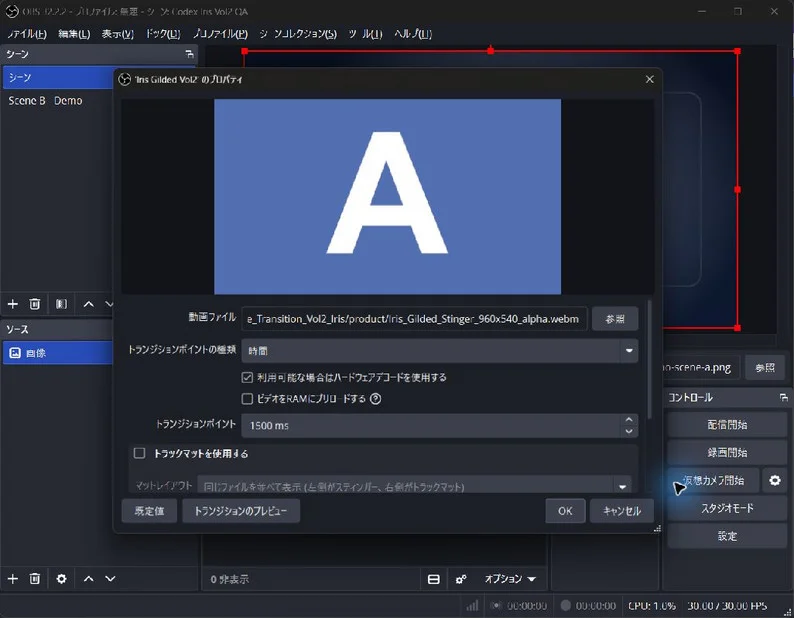
• Real OBS demonstration recording is available as a separate free download. Screenshots include a recording frame and the actual OBS Stinger settings.
OBS SETUP
1. In Scene Transitions, click + and choose Stinger.
2. Select Iris_Gilded_Stinger_960x540_alpha.webm or Iris_Prismatic_Stinger_960x540_alpha.webm from the full pack.
3. Set Transition Point to Time: 1500 ms.
4. Switch between two scenes and check the result. The free sample includes a 480 × 270 Stinger for compatibility testing.
These are one-shot scene transitions, not endlessly looping overlays. Demo backgrounds are not included. You may use the assets in monetized videos and streams; redistribution or resale of the files themselves is not permitted. Parts of the original blade artwork were generated with AI, then selected, composited and animated for this product.
Also on BOOTH: https://isjoker1031.booth.pm/items/8948881
 GetAssetPack