Description
🎨 Roblox UI Kit — Stats, Notifications, Shop & More ✨
A drop-in Roblox UI package with a money/stats HUD 💰, popup notification system 🔔, rainbow overlay 🌈, and a full main GUI 🎮 (shop, rebirth, upgrades, daily rewards, offline earnings, and more). Powered by TemplateUiKit 🧩 and SimpleStats 📊 — clean, modular, and ready to extend. 🚀
📦 What You Get
🖥️ 4 ScreenGuis (for StarterGui):
Show full description...
- 💰 Stats — money/stats HUD with gradient styling
- 🔔 NotificationsGui — stackable popup notification system
- 🌈 Rainbow — animated rainbow overlay effect
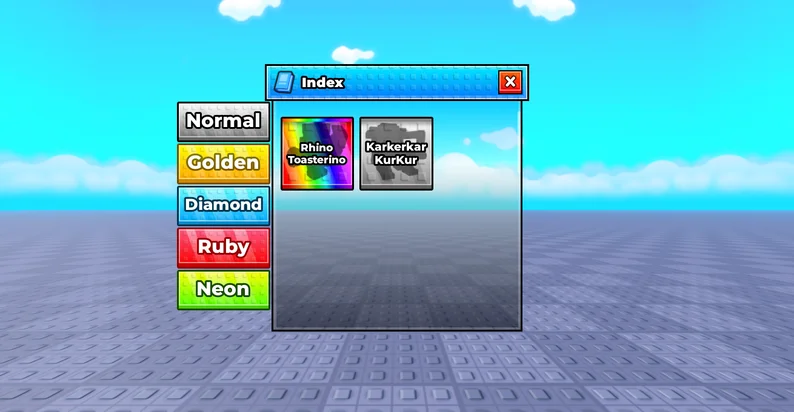
- 🎮 GUI — main interface including Shop 🛒, Rebirth 🔄, Upgrades ⬆️, Daily Rewards 🎁, Offline Earnings 💤, Starter Pack 🎒, Carry 📦, Index 📖, and Random Item 🎲 frames, plus a Mute Music 🔇 toggle
🧩 Framework modules:
- 🧩 TemplateUiKit — reusable UI framework with components like SimpleNotificationPresenter
- 📊 SimpleStats — complete stats system (server + client + shared)
All scripts ⚙️, animations 🎬, gradients 🎨, and layouts 📐 are included and ready to go. ✅
🚀 Installation
The package drops straight into Roblox Studio. Every folder is clearly labeled so you know exactly where it goes. 👌
- 📥 Download the .rbxm file and drag it into Roblox Studio. A PACKAGE_BUNDLE folder will appear in Workspace.
- 📂 Open PACKAGE_BUNDLE. Inside you'll find folders named UNGROUP IN -> <Service> plus a README script.
- 🔧 For each UNGROUP IN -> X folder:
- 1️⃣ Open the folder
- 2️⃣ Select all children (Ctrl+A)
- 3️⃣ Cut (Ctrl+X)
- 4️⃣ Navigate to the destination service in Explorer
- 5️⃣ Paste (Ctrl+V) ✨
📍 Destinations
Paste Into
UNGROUP IN -> StarterGui game.StarterGui
UNGROUP IN -> ReplicatedStorage.Other game.ReplicatedStorage.Other
UNGROUP IN -> ServerScriptService game.ServerScriptService
UNGROUP IN -> StarterPlayer.StarterPlayerScripts.Other game.StarterPlayer.StarterPlayerScripts.Other
💡 Note: If an Other folder doesn't already exist in ReplicatedStorage or StarterPlayerScripts, create one first. Then paste inside it.
- 🗑️ Once every bucket is empty, delete the PACKAGE_BUNDLE folder.
- ▶️ Playtest. The Stats HUD should appear, notifications should fire, and the main GUI frames should open as expected. 🎉
⚠️ Important Notes
- 🔁 TemplateUiKit is installed in both ReplicatedStorage.Other and StarterPlayerScripts.Other. This is intentional — both are needed. ✅
- 🔁 SimpleStats is installed in three places: ReplicatedStorage.Other, ServerScriptService, and StarterPlayerScripts.Other. All three are required. ✅
- 🔕 The in-Studio README script inside PACKAGE_BUNDLE is disabled and safe to delete once you've read it.
🛠️ Requirements
- 🎮 Roblox Studio (any recent version)
- 📁 A place with standard services enabled (StarterGui, ReplicatedStorage, ServerScriptService, StarterPlayer)
💬 Support
🆘 If a GUI doesn't show up after install, double-check that both copies of TemplateUiKit and all three copies of SimpleStats landed in the right services. That's the #1 issue. 🔍
Enjoy! 🎨🎉✨
 GetAssetPack