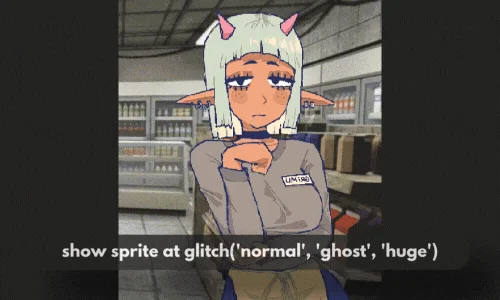
Version 3.0 : Digital distortion, ready-made presets & automatic caching.
Add horizontal glitches, fragmented corruption and RGB channel splitting to your characters and backgrounds. Choose a subtle interference pattern, a bright cyberpunk palette or an intense broken-image effect with a short Ren'Py command.
Show full description...
- One-file installation: place 11_glitch_shader.rpy in your project's game folder.
- Simple presets: combine five intensities, five palettes and five fragmentation settings.
- Automatic caching: reuse prepared images and effect results between changes.
Free / name your own price. Download the complete shader for free, or leave an optional contribution. Donations do not unlock extra features. Commercial and non-commercial use are allowed; credit GRIMUMU.
Select a section below to expand it. You can leave several sections open.
1. Installation & Quick Start
- Download 11_glitch_shader.rpy.
- Place it directly inside your Ren'Py project's game folder. Keep only one installed copy of this shader.
- Start or restart your project, then apply an effect to an image already defined in your game.
No extra packages, external textures or additional shader files are required.
# Use your own image name here. show eileen happy at normal_glitch
For example, if your image is called hero neutral, use show hero neutral at normal_glitch. The example names on this page are placeholders; character artwork is not included.
For a customized combination, select an intensity, palette and fragmentation setting:
show eileen happy at glitch( "intense", "cyberpunk", "huge")
New to Ren'Py? Put show statements inside a label, at the same indentation level as your dialogue. Copy the quoted parameter names exactly.
2. Effects & Usage Examples
Animated distortion
glitch() changes the corruption pattern over time. With no arguments it uses "normal" intensity, the "classic" palette and "thick" fragmentation.
show eileen happy at glitch() # Green/purple with fine fragments. show eileen happy at glitch( "normal", "toxic", "thin")
Fixed distortion pattern
glitch_static() holds the pattern at a chosen seed. It does not freeze the original image: blinking eyes or other source animations can continue underneath the fixed distortion.
show eileen happy at glitch_static( "extreme", "ghost", "thin", seed=15.0)
Temporary hit
glitch_hit() applies an animated burst and stops the effect automatically when its duration ends. Duration is measured in seconds; the default is 0.25.
show eileen happy at glitch_hit( "intense", "classic", duration=0.5)
Turn the effect off
show eileen happy at glitch_off
Use glitch_off explicitly. A plain show eileen happy can retain the transform already applied to that image tag. If you use other positioning transforms, include those in your at list as needed.
Images inside screens
Apply the effect to an image added to a screen with add … at. Replace the example image name with one from your project.
screen corrupted_portrait(): add "eileen happy" at glitch( "subtle", "classic", "thick")
Use these transforms through at or At(). Composition as inline blocks inside another ATL transform has not been validated.
3. Presets & Parameters
Choose your combination
The first three arguments are tier, color and slice, in that order. All names are lowercase and case-sensitive.
Intensity : tier
- "subtle" : light interference.
- "normal" : moderate distortion; the default.
- "intense" : stronger displacement and channel separation.
- "extreme" : large shifts and heavy corruption.
- "crashed" : the largest displacement setting, with a slower-changing pattern.
Examples for tier, the first argument. The other two arguments stay "classic" and "thick". Each line is an alternative. Copy only one line at a time.
show eileen happy at glitch("subtle", "classic", "thick") show eileen happy at glitch("normal", "classic", "thick") show eileen happy at glitch("intense", "classic", "thick") show eileen happy at glitch("extreme", "classic", "thick") show eileen happy at glitch("crashed", "classic", "thick")
Palette : color
- "classic" : red/blue channel separation with a green base; the default.
- "cyberpunk" : magenta and cyan.
- "matrix" : shades of green.
- "ghost" : bright grayscale channel mixing.
- "toxic" : green and purple.
Examples for color, the second argument. The other arguments stay "normal" and "thick". Each line is an alternative. Copy only one line at a time.
show eileen happy at glitch("normal", "classic", "thick") show eileen happy at glitch("normal", "cyberpunk", "thick") show eileen happy at glitch("normal", "matrix", "thick") show eileen happy at glitch("normal", "ghost", "thick") show eileen happy at glitch("normal", "toxic", "thick")
Fragmentation : slice
- "huge" : very broad bands.
- "thick" : broad bands; the default.
- "normal" : medium bands.
- "thin" : fine fragmentation.
- "dust" : the finest fragmentation setting.
Examples for slice, the third argument. The other arguments stay "normal" and "classic". Each line is an alternative. Copy only one line at a time.
show eileen happy at glitch("normal", "classic", "huge") show eileen happy at glitch("normal", "classic", "thick") show eileen happy at glitch("normal", "classic", "normal") show eileen happy at glitch("normal", "classic", "thin") show eileen happy at glitch("normal", "classic", "dust")
Optional controls
The first three arguments are always positional and always use this order: tier, color, slice. Optional settings come after them and must be written with their names, such as fps=12. Named settings can appear in any order.
These are the complete argument orders for each function:
glitch(tier="normal", color="classic", slice="thick", pad=None, fps=20, cache=True, drawable_resolution=False) glitch_static(tier="normal", color="classic", slice="thick", seed=1.0, pad=None, cache=True, drawable_resolution=False) glitch_hit(tier="intense", color="classic", slice="thick", duration=0.25, pad=None, fps=20, cache=True, drawable_resolution=False)
For example, the three required choices go first. Then add only the named options you want:
show eileen happy at glitch( "intense", "cyberpunk", "huge", fps=12, pad=48, cache=True)
The defaults are intended as a starting point. Each optional setting below includes a copyable example.
- seed=1.0 : glitch_static() only. A finite number selecting the fixed pattern. Seeds repeat modulo 64; changing the number can change the pattern.
- Example: show eileen happy at glitch_static("normal", "classic", "thick", seed=7.0)
- duration=0.25 : glitch_hit() only. A finite, nonnegative duration in seconds; 0 produces no active burst.
- Example: show eileen happy at glitch_hit("intense", "classic", "thick", duration=0.5)
- fps=20 : glitch() and glitch_hit(). A positive, finite limit on pattern updates, internally capped at 30 and also limited by the selected tier's pattern speed. It does not set the game's FPS or limit redraws requested by other animations.
- Example: show eileen happy at glitch("normal", "classic", "thick", fps=12)
- pad=None : all three functions. Automatic transparent padding based on the image width and displacement. An optional number sets equal left/right padding in pixels; a four-item tuple specifies (left, top, right, bottom). Smaller manual values can clip the effect.
- Example with equal left/right padding: show eileen happy at glitch("normal", "classic", "thick", pad=48)
- Example with a four-sided tuple: show eileen happy at glitch("normal", "classic", "thick", pad=(48, 0, 48, 0))
- cache=True : all three functions. Enables reuse of the effect result between pattern or source changes. False disables the output cache; it is an advanced comparison option, not a general performance improvement.
- Example for comparison only: show eileen happy at glitch("normal", "classic", "thick", cache=False)
- drawable_resolution=False : all three functions. Uses virtual-resolution intermediates with the default pixel budget. True opts into drawable/native-window resolution without that budget; it may improve fine detail at a higher graphics and memory cost.
- Example: show eileen happy at glitch_static("normal", "classic", "thick", drawable_resolution=True)
# Fewer pattern changes, not game FPS. show eileen happy at glitch( "normal", "classic", fps=12) # Sharper rendering, higher cost. show eileen happy at glitch_static( "normal", "classic", drawable_resolution=True)
Legacy named presets
These names remain available for use with at. They all use the "classic" palette.
- glitch_static_preset : fixed normal-intensity pattern with thick bands.
- subtle_glitch : subtle intensity, thick bands.
- normal_glitch : normal intensity, thick bands.
- intense_glitch : intense distortion, thick bands.
- extreme_glitch : extreme distortion, thick bands.
- subtle_broken_glitch : subtle intensity, thin fragments.
- normal_broken_glitch : normal intensity, thin fragments.
- intense_broken_glitch : intense distortion, thin fragments.
- extreme_broken_glitch : extreme distortion, thin fragments.
- crashed_glitch : the legacy combination of "extreme" intensity and "huge" bands. It is different from selecting the newer "crashed" tier.
show eileen happy at intense_broken_glitch
4. What's New in V3.0
- Cached effect output: reuse the rendered result until the pattern or original image changes, instead of recalculating the distortion on every draw.
- Separate source preparation: when only the glitch pattern changes, the prepared source image can be reused.
- Bounded pattern updates: the internal clock updates each effect instance without a per-pixel time calculation.
- Object-based padding: automatic margins use the actual image width, and padding no longer amplifies the physical displacement.
- Default intermediate-texture budget: each intermediate is limited to 921,600 pixels and 2,048 pixels per edge. Large inputs are downsampled while their displayed layout size is preserved. This is a per-texture limit, not a limit on all graphics memory used by the game.
- Explicit off command: glitch_off removes the effect; glitch_hit() stops its own effect updates when its duration ends.
Visual differences: downsampling can soften fine details. Corrected padding can change the appearance of extreme presets compared with older releases. Bright channel values are bounded before caching, which can also affect very bright palettes combined with external opacity transforms.
Caching adds a texture-rendering step when the result changes. It is most useful when that result can be reused; rapidly changing source animations offer fewer opportunities for reuse. Performance still depends on image size, active effects, the scene and the device.
5. Frequently Asked Questions
Is it really free? Do donations unlock anything?
Yes, the complete shader is free. You can enter zero in itch.io's name-your-own-price download flow, or contribute any amount you choose. Donations support the creator; they do not unlock extra shader features.
Can I use it in a commercial game?
Yes. You may use and modify the shader in commercial and non-commercial games, and distribute it as part of those games. Attribution to GRIMUMU is required whether or not you donate. The original shader and modified versions may not be distributed as standalone shaders, either free or paid.
How should I credit the creator?
Add a line to your game's credits, such as: “Glitch & RGB Split Shader by GRIMUMU.” A link to this product page helps others find the asset.
Do I need to know shader programming?
No. You only need to add the file and copy a short Ren'Py command, replacing the example image name with your own. The named presets do not require editing shader code.
What about blinking characters and layered animations?
The cache is designed to invalidate when the original image changes, including a change to a layered character's eyes. Between source changes, its prepared image can be reused. Check the appearance of your character in your own project; a source that changes every frame will offer less cache reuse than an occasional blink.
Does glitch_static() freeze my character?
No. It fixes the distortion pattern, not the animation underneath it. Use a non-animated source image if you also want the character to remain still.
How do I remove the effect?
Use show eileen happy at glitch_off, substituting your image name. Changing an expression without an at clause can preserve the existing transform. A temporary glitch_hit() ends its own effect automatically.
I copied an example and got an error. What should I check?
Check the image name, indentation, matching quotes and parentheses, and the exact lowercase preset names. Confirm that the file is installed inside game and that only one version is loaded. Older examples using strength or density as arguments to glitch() do not match the current API.
Why can a large image look softer?
The default resolution budget reduces large intermediate textures. This trades some fine detail for lower rendering and memory cost. The optional drawable_resolution=True setting opts into native-resolution rendering without that cap, at a higher cost.
Do I need to configure or clear the cache?
No manual cache setup or clearing is required. It is enabled by default and managed through Ren'Py's rendering system. It does not save a collection of animation frames to disk.
What has been checked for compatibility and performance?
Development checks used Ren'Py 8.5.3 on Windows: lint, native render-cache logic checks, and isolated GLSL compilation and graphics tests. These are not a complete visual or thermal certification. Integrated visual review, Android and HTML5 validation, and device-level power and temperature comparisons remain pending. No minimum compatible Ren'Py version, guaranteed FPS or heat-free operation is claimed.
How do I update from an earlier release?
Close the project and keep a backup of the previous shader outside game. Replace the old shader with 11_glitch_shader.rpy; do not install both versions together. If an old, differently named shader was removed, check for its matching orphaned .rpyc file too and move that old compiled copy out of game. Restart the project and review your effects. The listed legacy preset names remain available, but older custom parameter calls must be adapted to the current API.
6. License, Credits & Support
License for this shader: You may use and modify it for your commercial or non-commercial games. You may distribute the original or modified .rpy file as part of a game that uses it. You may not redistribute, share or sell the original shader or a modified version as a standalone shader, whether free or paid, including in shader or asset packs.
Attribution is required: credit GRIMUMU in your game's credits. Free downloads and optional contributions grant the same permissions.
Suggested credit: Glitch & RGB Split Shader by GRIMUMU
grimumu.itch.io/glitch-shader-renpy
If you would like to support future assets, you can leave an optional contribution when downloading on itch.io, or support GRIMUMU on Ko-fi.
Support GRIMUMU on Ko-fi
Questions or bug reports? Leave a comment on the product page. Include your Ren'Py version, target platform, the command you used and the error message, if any.
Follow GRIMUMU:
Twitter / X · Instagram · itch.io
 GetAssetPack