This pack is US$4 on its own. Get the six current full collections in the US$16 Factory Operations Six-Pack Bundle ($26 separately), or choose individual packs below.
Show full description...
Build recipe-flow diagrams, machine planning screens and production queues with matching node frames, routing pieces, ports and markers. Factory Operations — Production Planning Graphics uses the range’s paper-and-copper Warm palette and slate-and-mint Cool palette.
The full pack supplies 24 base artwork families represented by 58 component/state entries per palette. Choose editable SVGs or transparent PNGs, then assemble them with the recorded connection anchors and content regions.
Included in the full pack
- Five node families: single-input recipe, dual-input recipe, process, source and destination; each in ready, selected and blocked states.
- Nine route families: horizontal/vertical segments, four corners, split, merge and bridge crossing; each in idle, active and blocked states.
- Four port families: material input/output and fluid input/output, each open or connected.
- Six marker families: queue strip, batch plate, rate plate, priority flag, and horizontal/vertical flow-arrow overlays.
- 116 editable SVGs and 348 individual transparent PNGs at 1×, 2× and 4× source scales, across both palettes.
- JSON/CSV indexes with dimensions, native and scale-adjusted connection anchors, content regions and state information.
- Three assembly references, an offline HTML catalogue, README, commercial-use artwork licence, provenance and verification notes.
States, palettes and export sizes are counted separately from base parts. These are modular composition graphics, not 24 complete working planning tools.
Connect by anchors, keep your labels live
Connection coordinates sit inside each canvas. Align those anchors to join pieces; placing canvas rectangles edge to edge leaves gaps. State variants keep the same geometry, so your project can change the artwork without moving the connection.
All parts use fixed canvases and uniform scaling. They do not support nine-slice resizing. Blank icon and label areas let you add your own items, wording, amounts and rates. The crossing uses a bridge cue for two passing paths; it is not a four-way junction.
Try a complete small chain free
The 12-entry sample spans six base families: source-ready; the single-input recipe in all three states; destination-ready; the horizontal route in all three states; and material input/output ports in both states. Both palettes and all three PNG scales are included: 24 SVGs and 72 PNGs.
Assemble a source-to-recipe-to-destination chain entirely from sample files. The sample includes its own manifests, one closed assembly reference and offline catalogue. It uses the same commercial-use artwork licence as the full pack. Test these files in your intended software and at your actual display size before buying.
Matching Factory Operations range
- Icons · US$6 — 72 factory, logistics and status icon designs. Free sample.
- UI · US$5 — panels, buttons, inventory slots and interface states. Free sample.
- Controls & Readouts · US$4 — layered dials, tank meters, switches and indicators. Free sample.
- Materials & Components · US$4 — 48 manufacturing material and component designs. Free sample.
- Production Planning · US$4 — recipe nodes, routes, ports and queue markers. Free sample.
- Build & Placement · US$3 — tool cursors, construction footprints and placement guides. Free sample.
Choose individual packs or the US$16 Six-Pack Bundle ($26 separately). The bundle contains these six current products; future packs are not included. Each standalone download contains only its named collection.
Already own some packs? Compare buying only the missing packs before choosing a bundle. Automatic credit for earlier purchases is not promised.
Free shared quickstart: download the offline browser guide/demo from the Icons page’s Download demo section. It combines selected free-sample artwork from all six packs and explains nine-slice panels, readout layers, planning anchors and placement hotspots. Extract the ZIP and open index.html. This is an illustrative assembly reference; your game supplies behaviour.
Scope and compatibility
This is static artwork with an offline browsing and assembly reference. Your project supplies recipes, item artwork, labels, layout, input handling, production calculations and state behaviour. No game engine project, Theme resource, planning framework, recipe database, balanced economy, inventory backend, font files, sounds or animation logic are supplied.
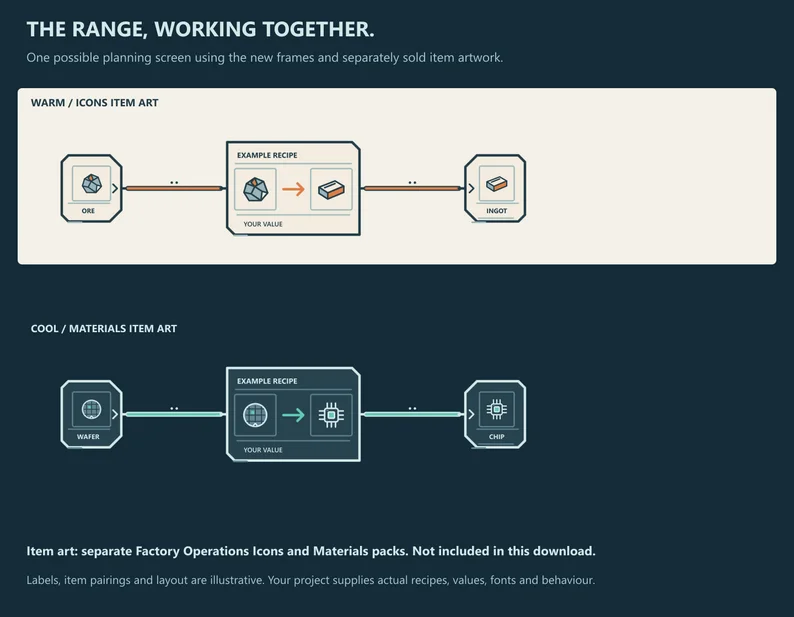
Promotional layouts, quantities and example flows illustrate possible uses. They are not working production or logistics systems. One labelled range-composition preview uses item artwork from the separate Icons and Materials & Components products; those item files are absent from this pack. Other planning previews show this collection’s artwork. Check VERIFICATION.txt for the actual completed file/import checks and their limits; these formats do not establish compatibility with every engine or future version.
Commercial use
Use and modify the supplied artwork in unlimited personal and commercial finished projects, with optional attribution and no additional royalties. Standalone redistribution or resale of the original or modified asset files is prohibited. Complete terms are in LICENSE.txt; the free sample uses the same artwork licence.
Creation disclosure and support
Generative AI assisted the vector artwork, production and catalogue code, previews and documentation. PNGs are raster exports of the included SVGs. No competitor artwork, third-party UI/icon library or font is bundled.
For a missing, corrupt or incorrectly described file, use the seller contact route on this page and include the version, filename and software. Custom artwork, bespoke conversions, engine integration and unspecified future additions are outside this offer.
 GetAssetPack