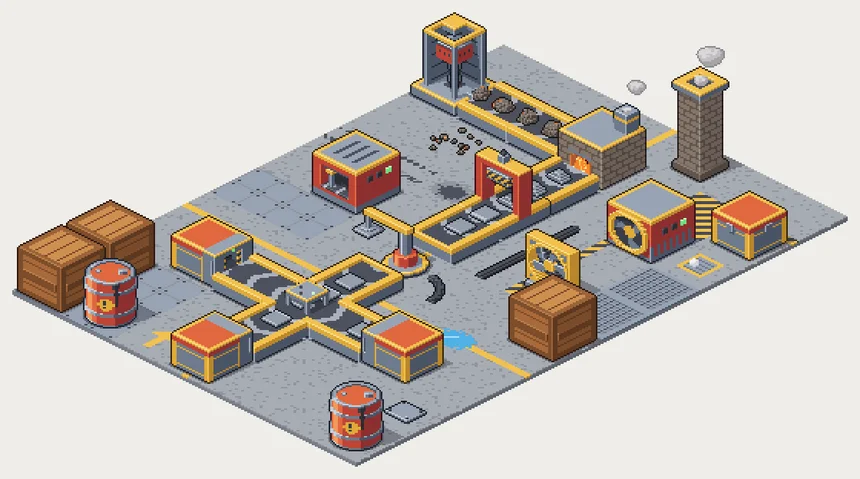
Animated isometric pixel art for factory and automation games: conveyor belts that carry items, machines that work, and every belt piece you need to build a line. Every sprite comes as a PNG sprite sheet and as an Aseprite file, with a tag per animation and an indexed palette. Try it above: build your own factory in the live preview, switch themes and pick your own colours.
Show full description...
Belts: 56 pieces, animated in seamless 8-frame loops
- straight belts, start and end caps, and all 8 curves
- side merges, 2-way and 3-way splitters
- ramps up and down, raised belts on pillars, underground entrances and exits
- straight belts loaded with each of the 6 items, baked in
Machines: 10 machines in 26 facings, each with a working loop and an idle loop
- drill, furnace (with fire and smoke), stamping press, assembler, robot arm, generator, fan, chimney, chest, and a receiving chest whose door opens for each delivery
- the robot arm picks an item off one belt and puts it on the next
- idle machines still breathe: fans coast, standby lamps blink, coals glow
Floors and decals
- 16 floor tiles that tile seamlessly: concrete, steel plates, grating, painted lanes, hazard stripes and edges, a drain, and a vent that puffs steam
- 13 decals to lay over any floor: oil stains, tyre tracks, a puddle, arrows, cables that join across tiles, debris, a patch plate
Items, icons and props
- 6 items that ride the belts (ore in 3 shapes, plate, ingot, sheet, box, barrel)
- 12 inventory icons, 32 x 32
- a crate and a barrel
4 colour themes: Industrial, Sci-fi, Rust, and Industrial redrawn in the ENDESGA 32 palette (every pixel a palette colour).
READY FOR YOUR ENGINE
- 64 x 32 tiles (2:1 isometric), 10 frames per second
- every animation is a PNG sprite sheet, frames side by side
- manifest.json gives every sprite's frame size, frame count, pivot and connections, plus the path items follow through each belt piece, so your game can move items itself
- splitters, the press and the robot arm also come in layers, so items can pass between their parts
- every sprite also comes as an Aseprite file (.aseprite): a tag per animation, layers, and the theme's palette in indexed colour, so changing one palette colour recolours it
- a README explains the folders, how to place sprites on the grid, and the manifest
- works with code tools: AGENTS.md gives coding assistants (Claude Code, Cursor, Copilot) the same rules and a worked example, so you can ask one to load the pack or build a level with it
YOUR COLOURS
- The pack includes a recolour page (it works offline in your browser): pick your own main, trim, metal and floor colours and it saves every sprite sheet in them, in one zip.
- Picked colours in the live preview above? Copy the colour code it shows under the colour pickers (it looks like FX1-i-c94f2a-f2c14e-7d8590-a39d94) and paste it into the recolour page to make the whole pack in those colours.
- For recolouring while your game runs (team colours, a machine that turns red when it breaks), every sprite also comes "indexed", with a palette image per theme and a palette-swap shader for Godot 4.
FREE SAMPLE
Download the free sample to try the pack in your engine first: enough pieces for a working line (a drill, belts, curves and a chest) in the Industrial theme, with its part of the manifest.
LICENCE
Use it in any project, commercial or not, and edit or recolour it as you like; credit welcome, not required. Do not resell or redistribute the files themselves as an asset pack, edited or not. The sprites in the live preview are for the preview only.
HOW IT'S MADE
Made with a procedural generator whose code was written with AI assistance. No AI image model drew any of the art; every sprite is built from small 3D voxel models and rendered by the generator.
More from softuki: HORIZONS
 GetAssetPack