GetAssetPack

Basic mechanics for TPS

Basic mechanics for TPS
Price
€27.33
Genre
Shooter

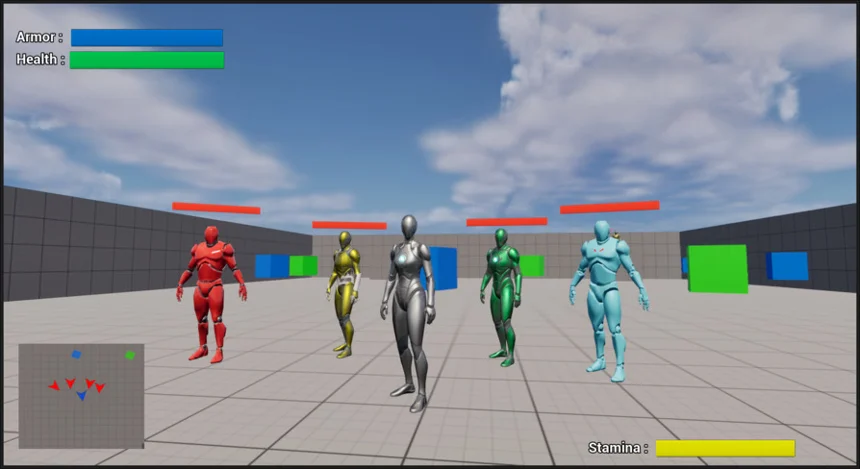
Third-person shooter mechanics include player combat, guarding, sprinting, item throwing, weapon pickup, health and armor items, and four enemy behaviors.

In this pack, you will find:The player who can deal damage to enemies with the left mouse click can protect himself from enemy attacks by going into guard position with the right mouse click. By pressing the Shift key you can sprint, which will deplete the stamina bar and you can also throw an item to distract enemies with the "G" key. It is also possible to pick up a weapon with the "E" key and drop it with "F".The red enemy starts by randomly walking around the map, when it sees the player it starts chasing them, then when it reaches them it starts attacking them. If he loses sight of the player, he will start walking randomly around the map again. He is sensitive to noise, when he hears a noise, he will move towards the noise.The blue enemy starts by patrolling specific points you have set on the map. When he sees the player, he begins to chase him, then upon reaching him, he begins to attack him. If he loses sight of the player, he will restart his patrol. He is sensitive to noise, when he hears a noise, he will move towards the noise.The green enemy starts by walking randomly on the map when he sees the player he starts throwing an object in his direction which will make noise and if it hits the player the player will be immobilized for a few seconds, then he will run away from the player. If he loses sight of the player, he will start walking randomly around the map again.The yellow enemy remains stationary on the map and when it sees the player it starts throwing an object in its direction which will make noise and if it hits the player the player will be immobilized for a few seconds.You will also find items on the map that allow you to regenerate your health and armor bar.When enemies die, they drop items that can be picked up by the playerThere is also a mini map that displays areas around the player in real time.Bonus: You can switch between the third-person camera and the first-person camera with the “C” key.You will also find in the files the mannequin…

Available on

Search by image

Upload a reference to find previews with similar colors, contrast, and detail.

Basic mechanics for TPS

Basic mechanics for TPS
Fab (Epic)€27.33
License not indexed
  • i Check the terms on the original listing.
Show full terms

In this pack, you will find:The player who can deal damage to enemies with the left mouse click can protect himself from enemy attacks by going into guard position with the right mouse click. By pressing the Shift key you can sprint, which will deplete the stamina bar and you can also throw an item to distract enemies with the "G" key. It is also possible to pick up a weapon with the "E" key and drop it with "F".The red enemy starts by randomly walking around the map, when it sees the player it starts chasing them, then when it reaches them it starts attacking them. If he loses sight of the player, he will start walking randomly around the map again. He is sensitive to noise, when he hears a noise, he will move towards the noise.The blue enemy starts by patrolling specific points you have set on the map. When he sees the player, he begins to chase him, then upon reaching him, he begins to attack him. If he loses sight of the player, he will restart his patrol. He is sensitive to noise, when he hears a noise, he will move towards the noise.The green enemy starts by walking randomly on the map when he sees the player he starts throwing an object in his direction which will make noise and if it hits the player the player will be immobilized for a few seconds, then he will run away from the player. If he loses sight of the player, he will start walking randomly around the map again.The yellow enemy remains stationary on the map and when it sees the player it starts throwing an object in its direction which will make noise and if it hits the player the player will be immobilized for a few seconds.You will also find items on the map that allow you to regenerate your health and armor bar.When enemies die, they drop items that can be picked up by the playerThere is also a mini map that displays areas around the player in real time.Bonus: You can switch between the third-person camera and the first-person camera with the “C” key.You will also find in the files the mannequin that I configured to make the animations so that you can create your own animations

Third-person shooter mechanics include player combat, guarding, sprinting, item throwing, weapon pickup, health and armor items, and four enemy behaviors.

View original listing