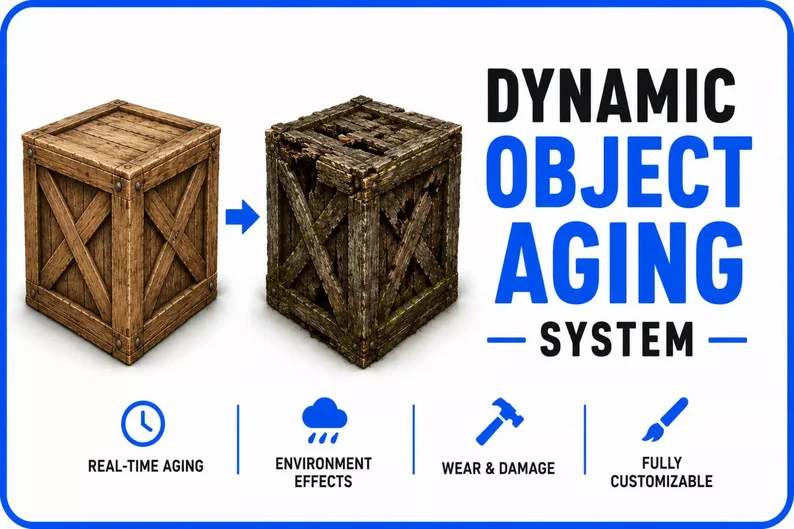
Dynamic Object Aging System is a runtime surface aging framework for Unity that allows scene objects to visually transition between different material states over time.
Objects can move from clean to old, rusty, dirty, cracked, wet, or burned using material-driven surface effects.
Show full description...
Create abandoned environments, rusty machinery, damaged props, wet surfaces, burned objects, weathered metal, dirty pipes, and aging industrial scenes directly at runtime.
⚙️ Main Features
- Runtime Object Aging
- Drive visual aging from new to old using a normalized age value.
- Multiple Surface States
- Supports rust, dirt, cracks, wetness, and burn damage effects.
- Material-Driven Effects
- Aging is applied directly on object surfaces through shader properties.
- Independent Aging Per Object
- Objects can share the same material while still having different aging states.
- MaterialPropertyBlock Runtime Control
- Runtime values are controlled efficiently without forcing unique material instances.
- Rain Controller
- Includes rain support using Unity Particle System.
- Automatic Wetness
- Objects can automatically become wet while rain is enabled.
- Edit Mode Preview
- Preview aging, rust, dirt, cracks, wetness, and burn values through Inspector sliders.
- Public C# API
- Control aging manually or connect it to gameplay systems.
- Reusable Aging Profiles
- Shared ScriptableObject profiles allow reusable settings across multiple objects.
⏳ Runtime Aging System
The system uses a normalized age value to control how old or worn an object appears.
Developers can increase aging automatically over time, adjust it manually, or modify it through gameplay events.
Aging Can Be Driven By
- Automatic runtime timers
- Gameplay damage events
- Weather exposure
- Repair mechanics
- Environmental triggers
- Quest or story progression
- Manual C# API calls
- Inspector preview sliders
🎨 Surface Effect States
Dynamic Object Aging System provides several surface states that can be mixed and adjusted to create different visual results.
Included Effects
- Old Surface
- Makes objects look aged, faded, and worn over time.
- Rust
- Adds rusty surface coloration for metal props, pipes, barrels, machinery, and industrial assets.
- Dirt
- Adds dirty surface buildup for abandoned, outdoor, survival, or neglected environments.
- Cracks
- Adds damaged cracked surface details.
- Wetness
- Makes surfaces look wet during rain or custom gameplay events.
- Burn Damage
- Adds burned and damaged visual states for fire, explosions, or destruction gameplay.
🧪 Standard-Style Overlay Shader
The package is built for the Built-in Render Pipeline and uses a custom Standard-style overlay shader.
Surface aging is controlled through shader properties, masks, colors, smoothness, metallic values, and contrast settings.
Shader-Based Controls
- Age amount
- Rust amount
- Dirt amount
- Crack amount
- Wetness amount
- Burn amount
- Effect masks
- Color settings
- Smoothness values
- Metallic values
- Effect contrast
🧩 MaterialPropertyBlock Workflow
Runtime values are applied using MaterialPropertyBlock.
This allows multiple objects to use the same shared material while still having their own independent visual aging values.
Useful For
- Large prop sets
- Repeated industrial objects
- Pipes and barrels
- Machinery groups
- Power boxes
- Modular level objects
- Runtime variation without duplicating materials
🌧️ Rain & Wetness System
The package includes a rain controller with Unity Particle System support.
When rain is enabled, compatible objects can automatically receive wetness values, making environments feel more reactive and dynamic.
Rain Features
- Rain controller component
- Unity Particle System support
- Automatic object wetness
- Runtime wetness control
- Weather system integration potential
👁️ Edit Mode Preview
Developers can preview aging effects directly in the Unity Editor using Inspector sliders.
This makes it easier to tune materials, test masks, adjust rust and dirt strength, and prepare reusable aging profiles.
Preview Controls
- Age preview
- Rust preview
- Dirt preview
- Crack preview
- Wetness preview
- Burn preview
- Material tuning
📁 Shared Aging Profiles
Shared ScriptableObject aging profiles make it easy to reuse settings across multiple objects.
Profiles help keep visual behavior consistent while still allowing runtime variation per object.
Profile Use Cases
- Rusty metal profile
- Dirty concrete profile
- Wet outdoor props
- Burned damage profile
- Abandoned machinery profile
- Industrial environment profile
💻 Public C# API
Dynamic Object Aging System includes a public C# API so developers can control aging from gameplay scripts.
Possible API Uses
- Increase aging over time
- Apply rust after exposure
- Add dirt from environment interaction
- Apply burn damage after fire or explosions
- Increase wetness during rain
- Reduce aging through repair systems
- Reset objects to a clean state
- Connect aging to quests or scripted events
🛠 Customizable Materials
Materials can be customized to match different art styles, environment types, and gameplay needs.
You Can Customize
- Base material colors
- Rust colors
- Dirt colors
- Burn colors
- Wetness intensity
- Crack visibility
- Surface masks
- Smoothness values
- Metallic values
- Effect contrast
🎮 Suitable For
- 🏭 Industrial Scenes
- Add rust, dirt, wear, and aging to machinery, pipes, barrels, and factory props.
- 🌲 Survival Games
- Make props and structures degrade over time or react to weather and damage.
- 🏚️ Abandoned Environments
- Create old, dirty, cracked, and rusty objects for ruined locations.
- 🌧️ Weather Systems
- Connect rain and wetness effects to environmental conditions.
- 💥 Damage Systems
- Apply burn damage, cracks, and visual wear after gameplay events.
- 🔧 Repair Mechanics
- Let players restore old, damaged, rusty, or burned objects.
- 📦 Props & Machinery
- Add variation to barrels, pipes, panels, power boxes, metal props, and equipment.
📦 Included
- Runtime object aging system
- Standard-style overlay shader
- Rust effect support
- Dirt effect support
- Crack effect support
- Wetness effect support
- Burn effect support
- Rain controller
- Unity Particle System rain support
- Shared aging profiles
- Demo scene
- Prefabs
- Materials
- Masks
- Scripts
- Documentation
⚙️ Technical Details
Core System
- Runtime object aging system for Unity
- Normalized age value
- Automatic aging over time
- Manual runtime control
- Independent aging values per object
- Edit mode preview with Inspector sliders
Surface Effects
- Rust
- Dirt
- Cracks
- Wetness
- Burn damage
Rendering
- Built-in Render Pipeline support
- Standard-style material overlay shader
- Surface effects applied through shader properties
- MaterialPropertyBlock-based runtime control
- Shared material support
Weather
- Rain controller
- Unity Particle System support
- Automatic wetness while rain is enabled
Profiles & Customization
- Shared ScriptableObject aging profiles
- Customizable material colors
- Customizable masks
- Customizable smoothness values
- Customizable metallic values
- Customizable effect contrast
Supported OS
Render Pipeline
Unity Version
- Unity 2021.3 or newer recommended
📖 Documentation
Documentation is included with the package and explains setup, material configuration, rain usage, aging profiles, runtime control, and shader-based surface effects.
Included Documentation
- Dynamic Object Aging System - Documentation.pdf
🧱 Make Objects Age Over Time
Add visible wear, rust, dirt, cracks, wetness, burn damage, weather reaction, and runtime material aging to your Unity scenes.
Dynamic Object Aging System provides a flexible material-driven foundation for aged props, damaged environments, weathered surfaces, and reactive object visuals.
 GetAssetPack