GetAssetPack

Custom picoCAD Shape Pack

Custom picoCAD Shape Pack
Price
Free
Creator
Speak the Sky

Twelve custom lo-fi 3D shapes for picoCAD projects, with a guide to their mesh data and adding them to projects.

new shapes for the lo-fi 3D modeller picoCAD

Available on

Search by image

Upload a reference to find previews with similar colors, contrast, and detail.

Custom picoCAD Shape Pack

Custom picoCAD Shape Pack1 / 17
Speak the Sky · itch.ioFree
License not indexed
  • i Check the terms on the original listing.
Show full terms

new shapes for the lo-fi 3D modeller picoCAD

Twelve custom lo-fi 3D shapes for picoCAD projects, with a guide to their mesh data and adding them to projects.

View original listing

Description

picoCAD is a really neat lo-fi 3D modelling tool with a very small range of default shapes: cubes, a few types of prism, square pyramids, and planes. However, it's possible to directly edit picoCAD project files to edit or even build new shapes. I put together this asset pack from some shapes I built this way; it includes picoCAD projects with 12 new shapes, plus a guide that includes the mesh data for each shape and instructions on how to add them directly to your own picoCAD projects.

Show full description...

Platonic solids

The Platonic solids are a set of mathematically foundational shapes. picoCAD includes one Platonic solid, the cube, but not the other four.

Tetrahedron Octahedron Dodecahedron Icosahedron

Larger pyramids

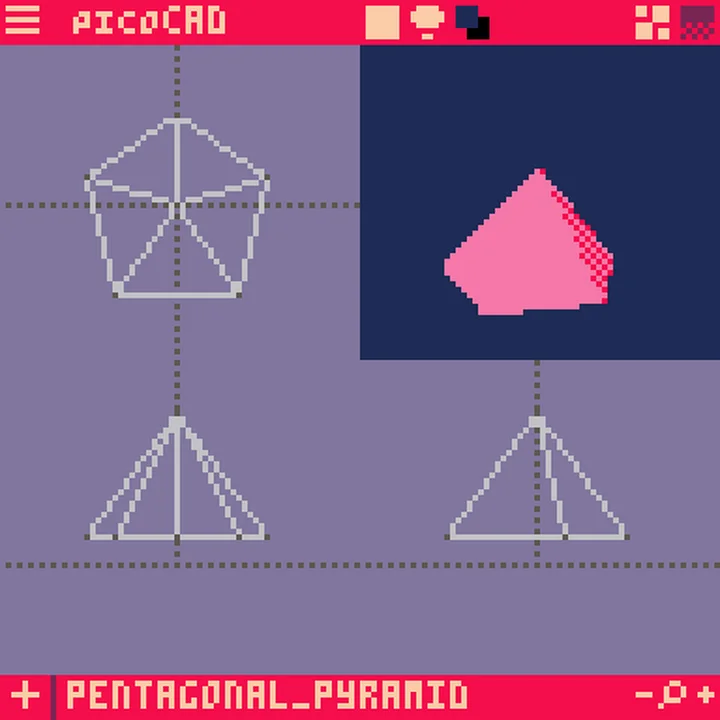
picoCAD includes the square pyramid by default and the set of Platonic solids above includes the triangular pyramid (the tetrahedron), but no larger bases.

Pentagonal Hexagonal Octagonal

Antiprisms

Antiprisms are like regular prisms in that they have the same shape on the ends and joining faces around the sides, but the joining faces are triangular (and there are twice as many).

Triangular Square Pentagonal Hexagonal Octagonal

Guide

This asset pack includes a guide file that explains the various shapes included and explains how to add them to your own picoCAD projects. Fair warning, if you want to add any of these objects to an existing project or use more than one type in a single project, you will have to open a picoCAD project file in a text editor and directly paste the new data in. The guide explains how to do this!

Tags

PICO-8picoCAD

Downloads