Clean Minimal: a calm, modern animated stream overlay pack in three colourways: Mono, Ocean and Coral. Switch between a light monochrome look, cool blue and warm coral, with the full set of stream assets in every colourway.
Show full description...
- 4 animated 1920x1080 scenes per colourway: Starting Soon, Be Right Back, Thanks for Watching and Offline. Includes text-free versions, still images, transparent text layers and a separate background loop.
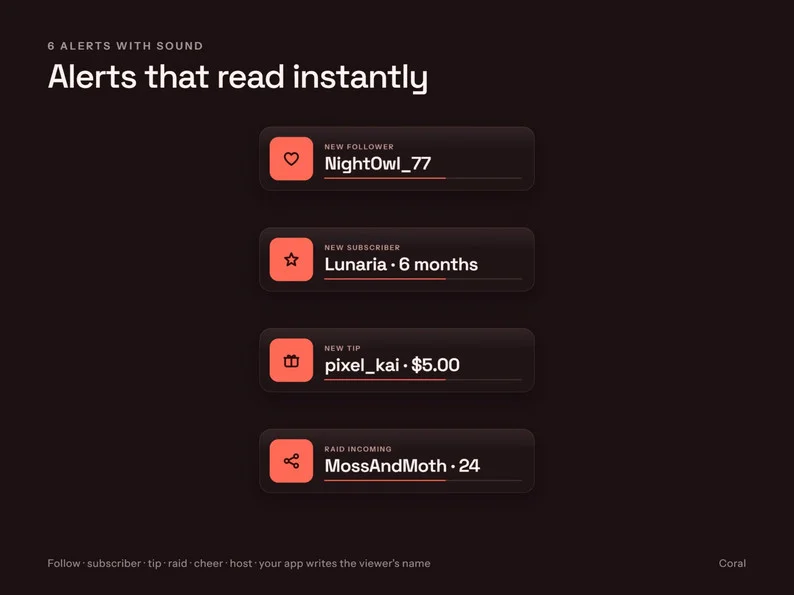
- 6 animated alerts per colourway: Follow, Subscriber, Tip, Raid, Cheer and Host, with sound, text-free variants and static PNGs. Separate MP3/OGG sounds are included. Your alert app supplies the viewer name; Host is a legacy event and availability depends on your platform.
- 16:9 webcam frame, arch webcam frame and chat frame: animated transparent WEBM and static PNG versions, with and without labels.
- 1.5-second stinger transition with sound, in each colourway; OBS transition point 800 ms.
- 10 Twitch panels plus 6 text-free panels, with corner-detail variants, at 320x160.
- 6 subscriber badges at 18/36/72 px and 6 emotes at 28/56/112 px per colourway.
- Plain and subtle-extras versions of animated files: light sweep, corner details and idle motion.
- Offline HTML browser source and configurator: set your own text, colourway, transparent background and individual extras without editing software.
- Space Grotesk and Instrument Sans fonts with SIL Open Font License texts, README, usage licence and a six-page PDF setup guide.
DELIVERY
4 ZIP files (Mono, Ocean, Coral and shared browser source/sounds/fonts) plus 1 separate PDF guide. Each file is below 20 MB. Download all five files and extract the ZIPs into the same folder so the shared files stay with the colourways. Formats include MP4, transparent VP9 WEBM, PNG, JPG, MP3, OGG and HTML. Scene loops are 8 seconds and frame loops are 6 seconds, at 30 fps. Digital download only; nothing physical is shipped. Example gameplay, webcam silhouettes, viewer names and chat messages illustrate a layout and are not live integrations.
OBS / STREAMLABS SETUP
1. Download all five files, extract the four ZIPs together, install the included fonts and restart OBS Studio or Streamlabs Desktop.
2. Add scene MP4s as looping Media Sources and place frame WEBMs above your camera/chat; for your own text or transparent scenes, open the included configurator and copy its Browser Source link.
3. Upload alert WEBMs to your Alert Box and configure its viewer-name text; add the stinger at 800 ms. The PDF covers OBS, Streamlabs and StreamElements.
LICENCE
One licence covers one streamer/channel brand, including monetised channels and sponsored streams. You may resize, recolour, crop and add your own text for that use. No resale, sharing, redistribution, inclusion in products for sale, claiming the designs as your own, or AI training. See LICENSE.txt for full terms. Fonts retain their separate OFL licences.
HOW IT WAS MADE
All images and animations: drawn by Riddlewick's own code. No stock art, no AI image generation.
Alert and stinger sounds: our own mixes that include CC0 1.0 sound material from Kenney (www.kenney.nl).
Fonts: Space Grotesk and Instrument Sans, SIL Open Font License 1.1.
Questions? Ask in the comments on this page.
 GetAssetPack