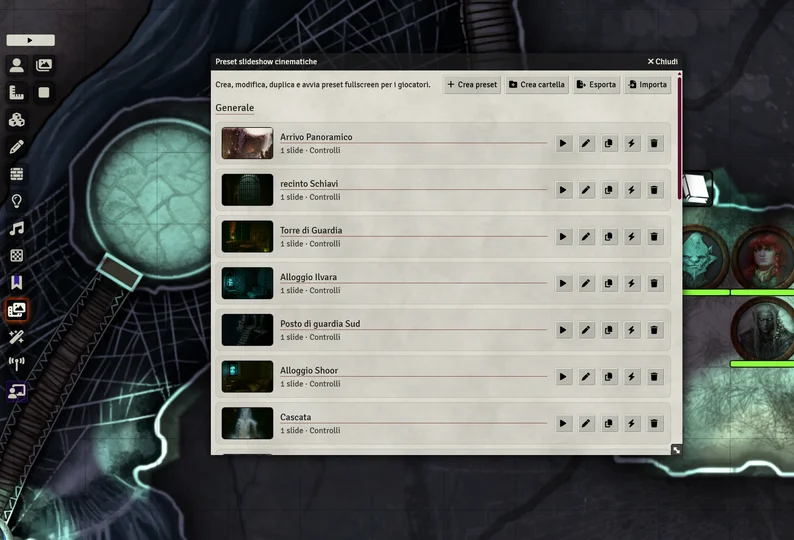
📜 Description Cinematic Slideshow is a Foundry VTT module designed to transform simple images into immersive visual sequences. Instead of manually showing images one by one, you can create reusable slideshow presets with full control over timing, transitions, captions, and audio. Perfect for storytelling, introductions, cutscenes, and dramatic reveals.
Show full description...
- ⏱️ Set duration, fade in, and fade out per slide — fades are additive (a 5s slide with 1s fade in/out lasts 7s total)
- 🎭 4 transition types per slide: Fade, Slide Left, Slide Right, Zoom In
- ⏸️ Pause / Resume during playback — via button or spacebar
- 📝 Add captions with:
- custom size
- position (top / center / bottom)
- style presets (epic, horror, narrator, dream, subtitle, etc.)
- 🔊 Add audio per slide with individual volume control (0–1)
- 🖼️ Choose image display mode:
- Centered (fully visible)
- Cover (fills screen, may crop)
- Original size
- 🚀 Image preloading — all images are cached at playback start for smooth, flash- free transitions
- 📂 Organize presets using folders with full support for:
- Create, rename, and delete folders
- Delete folder only (moves presets to root) or delete folder with all contents
- 🧲 Drag & drop ordering for presets and slides — drag onto collapsed or empty folders too
- 🟡 Active preset indicator — the currently playing preset is highlighted in the manager
- 📤 Export / Import presets as JSON — easily move presets between worlds or share them
- 🎯 Create hotbar macros for instant playback
- 🎮 Works seamlessly for all players via socketlib
- 🧠 Designed for fast GM workflow
🎯 Perfect for
- campaign intros
- story recaps
- cutscenes
- dream sequences
- boss reveals
- travel montages
- visual storytelling
- handouts and lore moments
💡 Why use it? Because clicking images manually breaks immersion. Cinematic Slideshow lets you present scenes in a smooth, controlled, cinematic way — without interrupting the flow of the session.
⚙️ Compatibility
- Foundry Virtual Tabletop v12 and v13
- Requires socketlib
- GM-focused module
📦 Installation
- Download the module
- Extract into: "FoundryVTT/Data/modules/"
- Enable the module in your world
- Open the Cinematic Slideshow Manager from the scene controls toolbar — or create a macro with:
<strong class="inline-flex items-center justify-center relative isolate shrink-0 can-focus select-none disabled:pointer-events-none disabled:opacity-50 disabled:shadow-none disabled:drop-shadow-none border-transparent transition font-base duration-300 ease-[cubic-bezier(0.165,0.85,0.45,1)] h-8 w-8 rounded-md backdrop-blur-md _fill_1abo4_9 _ghost_1abo4_96" type="button" aria-label="Copia negli appunti" data-state="closed">game.cinematicSlideshow.openManager();</strong>
5. Create your first preset
⚠️ Important This module does not include artwork or audio assets. Use your own content or assets you have the rights to use.
🔄 Updates This module is actively maintained. Future updates may include new visual styles, UI improvements, and additional features.
💬 Support If you encounter issues or have suggestions, feel free to contact me.
 GetAssetPack