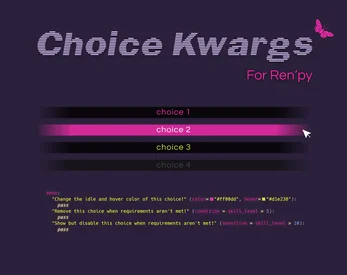
Show full description...
- Add tooltips to specific choices
- Display tooltip messages when hovering over individual choice buttons. Great for giving the player a warning before a risky selection! You can also add an alternative tooltip message for cases where the choice becomes disabled.
- Strikethrough disabled choices
- If conditions aren't met for choices, optionally make them appear with a strikethrough.
- Add custom image backgrounds for specific choice menus (or don't)
- This lets you emphasize important decisions or just give each menu its own personality.
- Use these features only when you need them
- You can use kwargs for extra customization, or keep choices default.
How It Works
This tool uses kwargs (key-word arguments) in the parentheses of your menu choices. Here’s what it looks like in action:
# You can pass arguments to the choice(items) screen inside # parentheses after 'menu' and before the colon. # This can be used to show a unique background image for a specific choice screen. # If you don’t need a background, just write 'menu:' as usual. menu(background="morning_choice_bg"): "It's time to wake up." # This is an ordinary choice with no kwargs. "Go back to sleep": "I'm so tired..." # This choice appears in a bright yellow, with a lighter hover, but only if energy_level > 3. # Otherwise, it's grayed out and disabled. "Wake up" (color="#FAFF39", hover="#f8fd6f", sensitive=energy_level>3): "Fine, I'll get up." # This one only shows up if cranky is True. # When shown, it's styled in red with a black hover and displays a tooltip warning when hovered. "Curse the universe" (color="#ff0000", hover="#000", condition=cranky, tooltip_text="Don't click this option"): "You know what, this universe sucks!" # This one has no condition, it always shows up. # It's here to demonstrate how to style a normal choice with a color + hover. "I need coffee..." (color="#a07d69", hover="#382015"): "Coffee will fix this." # This one displays a different tooltip message dependent on whether it's disabled or not. "Be productive" (sensitive=energy_level>5, tooltip_text="Sounds like a good idea...", disabled_tooltip_text="Your energy is too low."): "Okay, guess I'd better start!"
When you set a custom color/hover for a sensitive choice, it will use those when clickable, and switch to gui.choice_button_text_insensitive_color when unclickable.
That’s it! You now have full control over the look and logic of your menu choices.
I may update this project to include additional features in the future. If you have any ideas, let me know what would be useful!
 GetAssetPack