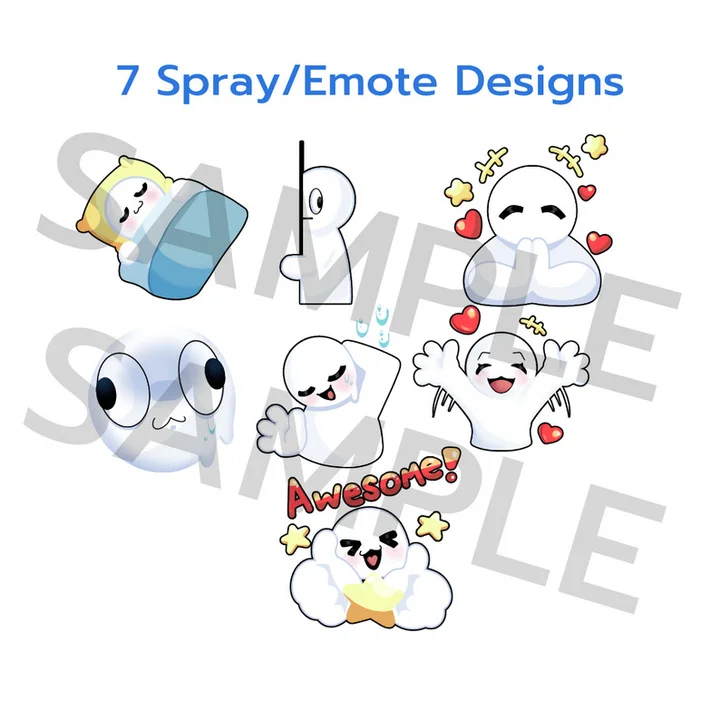
Thanks for stopping by for a chat! You know who else likes to chat? Your players!
Whether you're making an MMORPG, a Top Down MOBA, a multiplayer deceit game, or online PvP Arena, emotes and sprays are a wonderfully simple way to get players to interact with one another.
Show full description...
Additionally, if you'd like to, you may use these as FREE emotes on Twitch and Youtube.
As for integration into any game creation software, it depends on how you'd like to do it. I'm most familiar with Unity and Unreal. For beginners who want a quick way to add them into a 3D game:
When in Unity and Unreal Engine for a First Person Game: Upload the image assets into the applicable software, then create materials for each image. When a player wants to use a spray, code an onscreen UI or keyboard button based system for players to use a spray. When the corresponding onscreen UI or keyboard button is pressed, spawn a plane (make sure to define the size), and set the material for that plane to the correct spray.
For example:
"The player pressed the T key-bind for the "Um..." Spray" while detecting an object's collision in front of them within their hitbox --> Object Collision is true --> Spawn Play with Set Material "Um...". Else, do nothing/return.
I'd also recommend programming a check for if the player has already placed down a spray. Maybe a Boolean type check called "hasSprayed" or whichever you like.
When in Unity or Unreal creating a Top Down Game: I recommend a similar system to the First person game method above. Create materials for each image but instead spawn a plane above the player character with the corresponding emote material for (x) amount of second, then disappear/delete itself. Additionally, when spawning the plane, code the plane to only face the camera regardless of player movement and rotation. This way the emote will always spawn facing the player. Optionally, you can play a sound, or code the plane to scale from small to large for a bounce in spawn animation, or whatever you like! In this method, you do not need a Boolean, as the plane should be set to destroy itself afterwards to reduce server load.
There are more ways to integrate these emotes, play around with your code and find what works best for you!
Best of luck game dev!~
Notice: Assets may be modified but not resold. The asset is usable in both personal and commercial projects. When used in a commercial product, feel free to credit me though it is not necessary. Base assets are sized to Unity 3rd person controller. This set in particular is made to be larger than the player to emphasize the fantasy setting. Feel free to resize them in engine. You may not redistribute this asset or any modified version of it on any other platform.
Asset Stats:
7 Emotes/Spray designs.
1 folder of 128x128px 72dpi PNGs formatted images.
1 folder of 512x512 72dpi PNGs formatted images.
 GetAssetPack