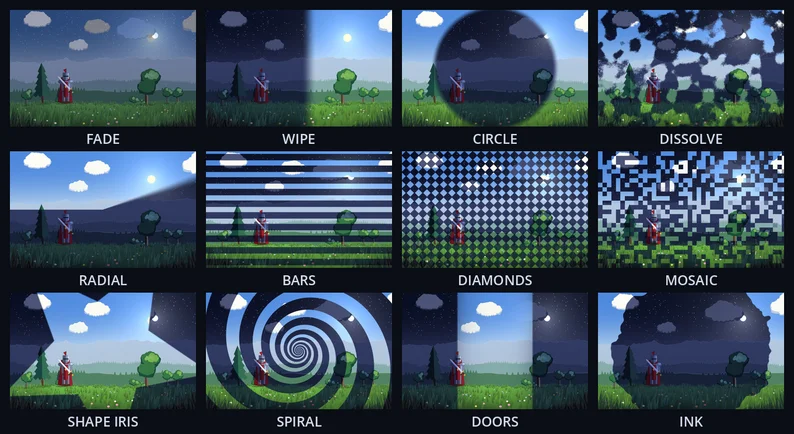
Go from the menu to the level, or from day to night, with a transition that looks finished: one line of code, 15 styles to pick from, for Godot 4.
This pack is also in the Almios Complete Collection: all 15 paid packs for 29.99 USD, less than a third of their prices one by one.
Show full description...
12 curtain transitions (fade, wipe, circle iris, dissolve, radial clock wipe, venetian bars, diamonds, mosaic, star iris, spiral, doors, ink) plus 3 made of your game's own picture (crossfade, pixelate, push). Pure canvas_item shaders and one autoload, so it is a small download and runs on Forward+, Mobile and Compatibility.
Transition.change_scene("res://level2.tscn", "circle_wipe", 0.5)
That covers the screen, loads the scene and reveals it. No external assets, no BackBufferCopy, no setup beyond one autoload. The demo above is the same one that ships in the pack: every transition loops in its cell, Space runs a full-screen transition through the Transition manager (the picture behind it changes while the screen is covered), 1, 2 and 3 play the three picture-based ones.
Set up in two steps
1. Copy the shaders/ and scenes/ folders into your project, side by side.
2. Project Settings > Globals > Autoload: add res://scenes/transition.gd with the name Transition.
The 12 curtain transitions
Names to pass: "fade", "wipe", "circle_wipe", "dissolve", "radial_wipe", "bars", "diamonds", "mosaic", "shape_iris", "spiral", "doors", "ink".
- Fade, wipe, bars, radial: a uniform fade, a straight wipe at any angle, venetian blinds (horizontal or vertical), a clock-style sweep.
- Circle, diamonds, mosaic: a circle growing from any point, a grid of diamonds, tiles popping in at random.
- Dissolve and ink: big soft blobs with a fine grainy edge, and a blot of ink with a ragged edge that flings droplets and swallows them.
- Shape iris: a star (default), heart, diamond or circle closing on a point, with an optional spin.
- Spiral and doors: curved spiral arms winding in from the edges, and two doors sliding shut with soft shadows and lit edges.
- Close on the player: Transition.focus = $Player and the shaped iris and the spiral close on the player, the circle and the ink grow from them, following them as they move.
Pass a color after the duration to change the curtain (Color.WHITE for a flash). The circle, iris, spiral, ink, diamonds and mosaic keep their proportions on any screen size. Every transition is clear at exactly 0 and fully covered at exactly 1, so the scene swap never shows a gap.
Any setting of a curtain can be given for one call: an iris closing on the player, a heart iris, ink from the spot where the player died. Transition.change_scene("res://level2.tscn", "shape_iris", 0.6, Color.BLACK, {"center": at, "shape": 3}), with at the player's place on the screen (0 to 1). The README has a table of every setting. change_scene() takes a path or a PackedScene you preloaded or loaded in the background.
Made of the game picture
No curtain: the old scene melts into the new one, breaks into growing pixels, or slides out.
Transition.change_scene_snapshot("res://level2.tscn", "crossfade", 0.6)
Or around any change of your own, such as a menu or a room swap: Transition.snapshot("pixelate", 0.6), then change anything and it appears from under the old picture. The screen is copied once, about 1 to 5 ms on a desktop.
Work in between
await Transition.cover("dissolve", 0.4) # load a save, rebuild the level... await Transition.reveal("dissolve", 0.4)
If a newer transition takes over, cover() and reveal() return false, so you can skip the swap. Calling change_scene() twice in a row is safe: the scene still changes once, behind a closed curtain. The manager keeps running while the game is paused and ignores Engine.time_scale, so a hitstop does not stall it. Signals covered and revealed, and is_busy(), are there too.
In the pack
- 12 commented .gdshader transitions and the snapshot shader behind crossfade, pixelate and push
- The Transition autoload (cover, reveal, one-line scene change)
- The demo project
- README with a parameter table and copy-paste examples
Compatibility and license
Godot 4.3 and newer, tested on 4.3 and 4.7, in Forward+, Mobile and Compatibility. Use in unlimited personal and commercial projects and modify freely. Please do not resell or redistribute the pack itself.
More from Dimension Almios
- Game Feel Kit: hitstop, screen shake and impact effects in one line
- Retro Display FX: CRT and retro screen looks for a whole game window
- Nature 2D: whole side-scroller landscapes to move between, with a day and night cycle
- 2D FX Essentials: free, with a live browser demo
Every pack we make, free and paid, is on one page: dimensionalmios.itch.io
 GetAssetPack