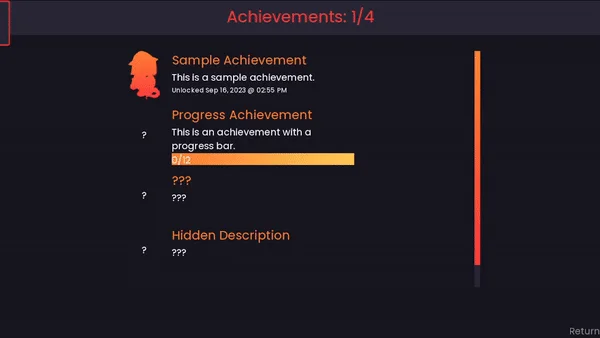
Easily include achievements for your Ren'Py game, with support for both in-game achievements as well as built-in Steam integration.
Show full description...
- Fully compatible with Steam's backend; just set up Steamworks with the same IDs you give to your achievements when you declare them.
- Optional in-game achievement gallery and popups.
- Fully customizable, with several layout examples.
- A config value will turn off achievement popups so you can also just use this tool as a simpler way to add Steam achievements.
- Track progress towards an achievement with a stat. Also compatible with Steam's backend. You can display progress in the achievement gallery as a number (e.g. 5/12) and/or a bar showing completion percent (or neither).
- Includes a convenient set tracking feature to protect against rollback and double-counting progress.
- Optionally set up callbacks when an achievement is granted. Built-in examples show how to use this to unlock an achievement when other achievement(s) are granted. Can be used to set up a "platinum" achievement automatically earned after all other achievements are unlocked.
- Compatible with translations.
Instructions
Download achievements.zip and unzip it. Place the two provided rpy files into your project's game/ folder. To immediately test the achievements, make a button to go to the achievement gallery e.g.
textbutton _("Achievements") action ShowMenu("achievement_gallery")
You will see the gallery with four example achievements. Clicking an achievement during development will toggle granting and clearing it, so you can see the popup.
achievement_backend.rpy contains the essentials for the game to run. achievements.rpy contains the information you can modify yourself, such as updating the screens or declaring achievements. Several examples are provided, and a demo label is included, which you can jump to with a line like jump achievement_examples.
A simple achievement might look like:
define bad_ending = Achievement( name=_("Dream Crusher"), id="dream_crusher", # Used for Steam backend! description=_("See the bad ending"), unlocked_image="gui/achievements/bad_ending.png" )
You can then grant this achievement in-game via:
$ bad_ending.grant()
Compatibility
This system has been tested for compatibility with Ren'Py 7.5-7.6 and 8.0-8.5. Leave a message in the stickied thread if you run into any bugs.
Terms of Use
You may:
- Use this code in commercial and noncommercial projects
- Modify and edit the code to suit your needs
You may not:
- Resell all or part of the code as-is or sell it with modifications
- Release any projects created using this code without providing attribution
Attribution must be credited as Feniks, with a link either to the page with this code or to https://feniksdev.com
Final Notes
If you're looking for systems to add extras to your game, you might also be interested in my multi-touch gallery:
Follow me to be informed of future tools! Consider also looking at my other Ren'Py tools, which I've added to a collection here: https://itch.io/c/3491447/my-renpy-tools. I also release tutorials on my website, https://feniksdev.com
A new tutorial on my website is also available! This tutorial will walk you through how to put together images to make AlphaMasks in Ren'Py, and includes examples of masks for my Layered Image Masks tool. Find the tutorial here!
 GetAssetPack