GetAssetPack

3D Shadow for 3D light Construct 3
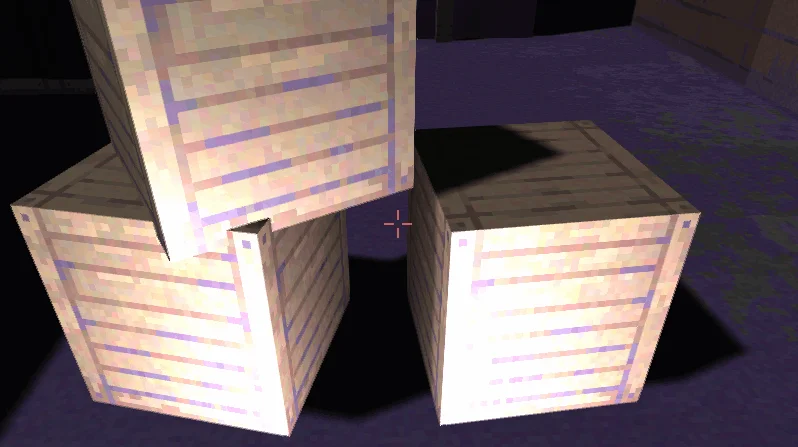
3D Shadow for 3D light Construct 3
Price
$6
Type
3D Models
Creator
Jonasz O.
Dimensions
3D
Engine
Construct
Animation
Animated

A Construct 3 plugin that adds real-time shadows for 3D shapes and models, plus screen effects including ambient occlusion, anti-aliasing, bloom, depth of field and reflections.

Real-time dynamic shadows for the native 3D Light: Spot, Directional and Point, with soft edges. Just add the plugin.

Available on

Search by image

Upload a reference to find previews with similar colors, contrast, and detail.

3D Shadow for 3D light Construct 3

3D Shadow for 3D light Construct 31 / 5
Jonasz O. · itch.io$6
3D Models
License not indexed
  • i Check the terms on the original listing.
Show full terms

Real-time dynamic shadows for the native 3D Light: Spot, Directional and Point, with soft edges. Just add the plugin.

A Construct 3 plugin that adds real-time shadows for 3D shapes and models, plus screen effects including ambient occlusion, anti-aliasing, bloom, depth of field and reflections.

View original listing

Description

3D Shadows for 3D Light (alpha)

Worker Mode / SDK 2 / WebGL 2 / WebGPU

Real-time dynamic shadows and screen effects for Construct’s native 3D Light. Add one plugin, and your 3D scene finally casts shadows and looks the part.

Show full description...

Construct 3 has native 3D Light, 3D Shape and 3D Model, but no shadows and no post-processing. 3D Shadows adds real shadow mapping and screen effects straight into Construct’s own renderer: real geometry, real lights, updated every frame. No sprites, no fake blobs, no baked lightmaps.

Shadows

  • Real shadows from real geometry. 3D Shapes and 3D Models cast shadows onto every lit 3D object.
  • All three native light types: Spot, Directional and Point. Point lights cast shadows in every direction.
  • Up to 16 shadow-casting lights at once. The strongest lights are picked automatically.
  • Fully dynamic. Move the light, the caster or the receiver, and the shadow follows in real time, including animated models.
  • Soft edges with adjustable PCF filtering (hard, 3×3, 5×5, 7×7).
  • Works with Construct’s PBR lighting. Shadows affect the direct light of the casting light and, optionally, ambient light, so they stay visible under weak lights.
  • Contact shadows at the base of models (WebGL 2): a soft darkening where objects meet the ground.
  • Screen-space ambient occlusion (SSAO) for crevices and corners, on WebGL 2 and WebGPU.

Screen effects

  • Temporal Anti-Aliasing (TAA) with Low, Medium and High presets, on WebGL 2 and WebGPU.
  • Bloom with Low, Medium and High presets, on WebGL 2 and WebGPU.
  • Depth of Field with focus distance, aperture and mode (both, background or foreground), with Low, Medium and High quality, on WebGL 2 and WebGPU.
  • Screen-space reflections on upward-facing surfaces, on WebGL 2 and WebGPU.
  • Exclude whole layers or individual objects from the effects, so HUD and UI stay sharp.

Control

  • Event actions for every feature: contact shadow quality, SSAO quality, TAA on/off and quality, Bloom on/off and quality, Depth of Field on/off and quality.
  • Quality presets, so you can start at Medium and tune from there.

Zero setup

Add the object once, press Preview, and shadows work automatically with every 3D Light in your project. WebGPU post effects need the 3DS Passthrough effect on the layout.

Tags

3dlight3dshadowsaddonlightpluginShadows

Downloads